PV design software for installers

From the roof to the technical report and financials, in minutes.

Radiaris simulates production, shading, batteries and profitability of self-consumption installations, and prepares the report for your client. An engineering engine with the simplicity an SME needs.

No commitment14 days free, no cardGDPR-compliant data
app.radiaris.comResults

Home · Pamplona · 5.0 kWp

Typical June day · production versus consumption
00h06h12h18h24h
PV productionConsumption
Payback6.8
IRR13.4 %
Self-consumption61 %
☀
8,760 hsimulated
⌁
PDF reportready in one click
Residential, commercial and industrial installations
With or without export, with or without batteries
3DScene design with shading, simple and intuitive
Compare scenarios
0languages
The problem

Designing an installation properly should not take you an afternoon

01

Every proposal eats up hours

Measuring, simulating, comparing equipment, calculating profitability and laying out the report. With every client, from scratch.

02

Spreadsheets nobody can audit

Formulas copied from project to project, without knowing what assumptions lie behind them or how to explain them to the client.

03

Powerful tools, but expensive and slow to learn

Designed for large engineering firms, with per-team licences and weeks of training that an SME does not have.

Radiaris brings the whole workflow together in a single tool, in six guided steps.

How it works

From the client's address to the proposal, in six steps

  • 1
    Project setupInstallation and client type
  • 2
    Site and roofLocation and 3D roof
  • 3
    Consumption and tariffHow much they use and pay
  • 4
    DesignEquipment, placement and strings
  • 5
    EconomicsCosts, financing and analysis
  • 6
    ResultsSimulate and review
STEP 01

Project setup

Choose the installation and client type. With or without export, with or without a battery, or off-grid; home, business or industry. The other steps adapt to your choice.

With export
Without export
With battery
Off-grid
Home
Shop
Industry
STEP 02

Site and roof

Search for the address, draw the planes on the satellite image or import the outline from the Cadastre. Mark chimneys, trees or neighbouring buildings in the 3D editor.
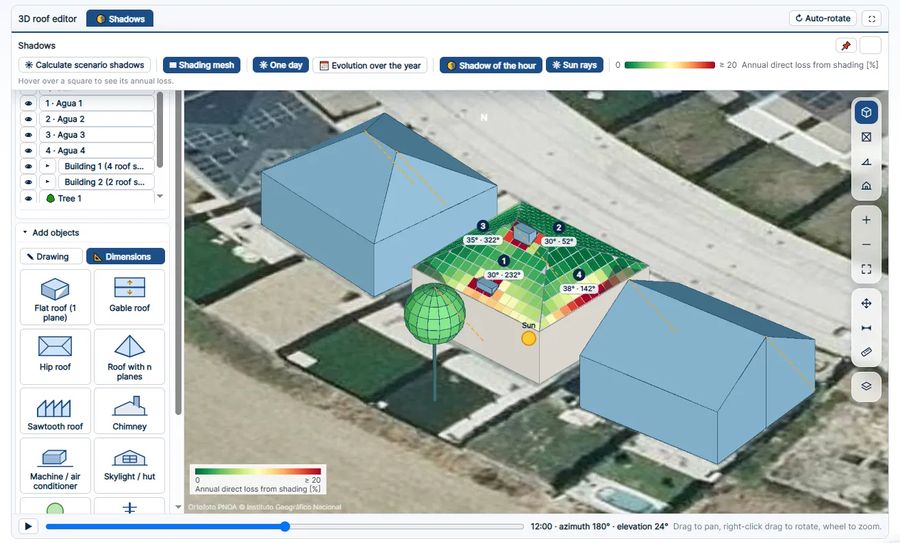
3D roof editor with the shading map
STEP 03

Consumption and tariff

How much the client uses and pays. Add special loads such as an electric vehicle or a heat pump and see how self-consumption and profitability change.
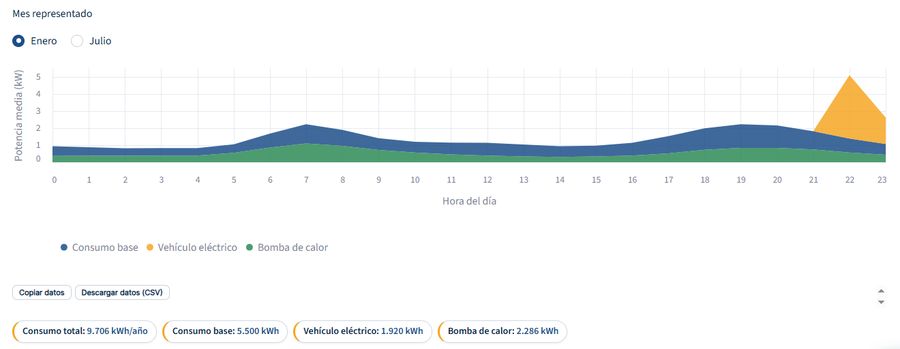
Consumption profile with electric vehicle and heat pump
STEP 04

Design

Equipment, placement and strings. Electrical model with MPPT, voltage and current ranges, and compatibility warnings before the equipment reaches the site. Or let the engine propose the optimal design.
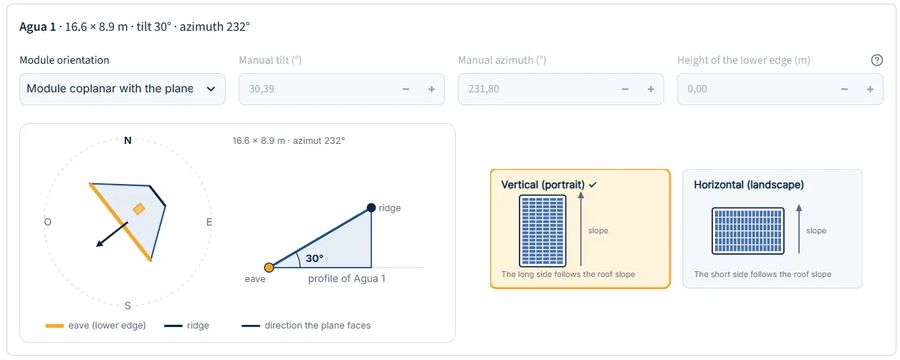
Orientation of each plane and module placement
STEP 05

Economics

Costs, financing and analysis: savings, payback, NPV, IRR and LCOE with inflation, degradation and replacements.
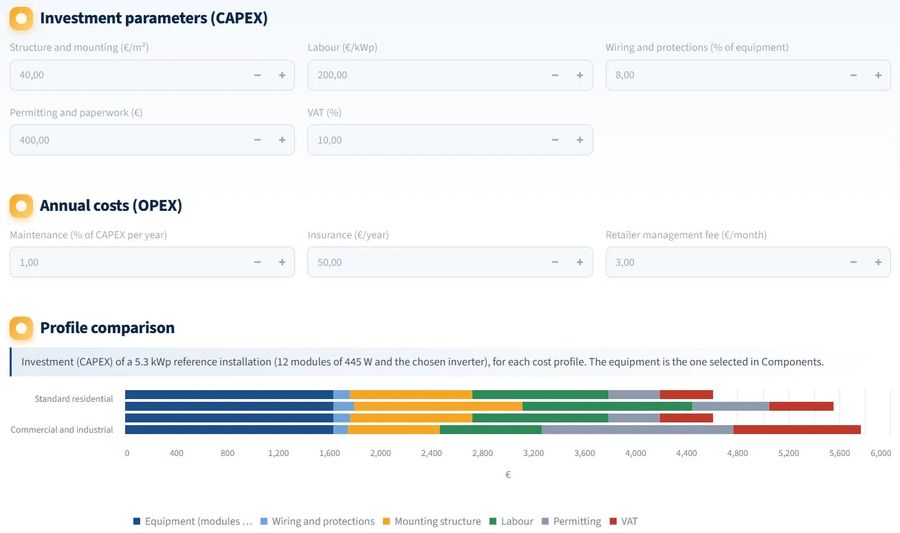
Investment parameters and comparison of cost profiles
STEP 06

Results

Simulate and review. Compare scenarios side by side, ask the AI assistant why each number comes out as it does and generate the report for the client.
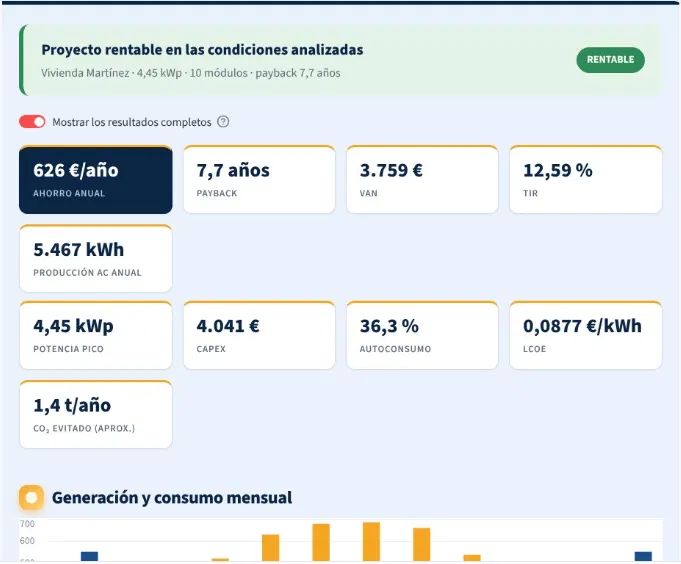
Simulation results
Product

The whole design workflow, in a single tool

Hour-by-hour calculation

PVGIS typical weather year, plane irradiance, cell temperature, optical, electrical and inverter losses.

8.760

hours per simulation

Real shading

Chimneys, trees or neighbouring buildings in 3D, with the effect of bypass diodes and strings.

Roof on the map

Draw on the satellite image or import from the Cadastre. Export and import in 3D (DXF/OBJ).

Off-grid or grid-connected

With or without export and battery, export limit and charge and discharge strategies.

Strings and inverters

MPPT, voltage and current ranges, and compatibility warnings before going on site.

Full economic analysis

Savings, payback, NPV, IRR and LCOE with inflation, degradation, financing and replacements. P50, P90 and P95 scenarios.

NPV+€8,420
IRR13.4 %
LCOE€0.05
Example values

Automatic or optimal design

The engine proposes modules, strings and batteries according to your criterion: maximum NPV, maximum self-consumption or covering a percentage of consumption.

Cabling and protections

Cross-sections, voltage drop, fuses and protections according to the Spanish REBT, with the losses included in the calculation.

Electric vehicle and heat pump

Add special loads to the consumption profile and compare.

Equipment database

Modules, inverters and batteries included. Add your own, also from the PDF datasheet.

Comparable scenarios

Save several alternatives of the same project and compare them side by side.

PDF report and offer

Full or summary report and commercial offer, with your logo and your details.

AI assistant

Ask why a result comes out as it does and get the explanation with your project's figures.

Guided tutorial

A walkthrough the first time and contextual help at every step, so your team works confidently from day one.

10 languages

The application and the reports, ready for your clients wherever they are.

EspañolEnglishPortuguêsDeutschFrançaisItalianoPolskiNederlandsTürkçeČeština
Calculations you can defend

You will know where every kWh comes from

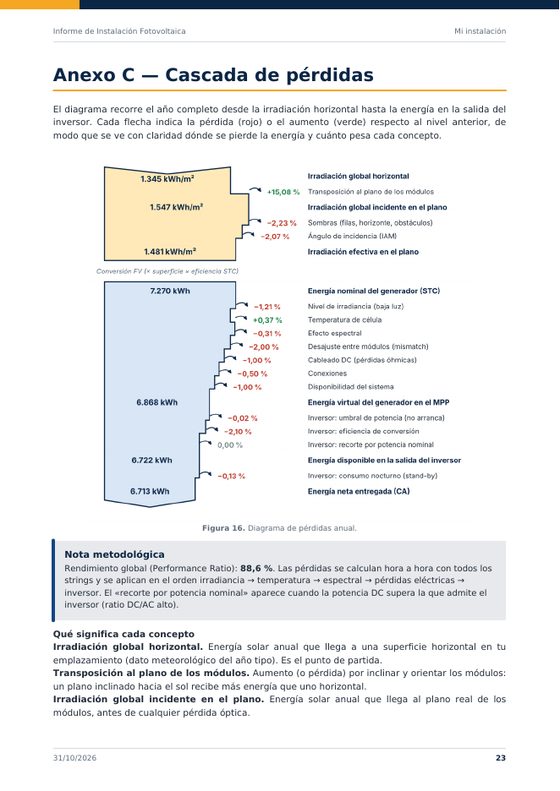
The engine uses published, proven models, and every result is explained: from irradiation to delivered energy, with the losses broken down one by one.

  • Transposition, cell temperature, angle of incidence and spectrum models with published references.
  • Checked against pvlib, closed-form formulas and hand-worked cases, plus energy conservation checks.
  • Uncertainty range (P50, P90, P95) on production, savings and profitability.
  • Methodology and references included in the annex of every report.
FROM IRRADIATION TO ENERGY · EXAMPLE
Plane irradiation
100 %
Shading
−4 %
Angle of incidence
−3 %
Cell temperature
−7 %
DC/AC cabling
−2 %
Inverter
−3 %
Energy delivered
81 %

Illustrative breakdown. Each report shows the one for your project.

Hay-DaviesPerezFaimanMartin-RuizSingle-diode modelPVGIS TMYpvlib Hay-DaviesPerezFaimanMartin-RuizSingle-diode modelPVGIS TMYpvlib
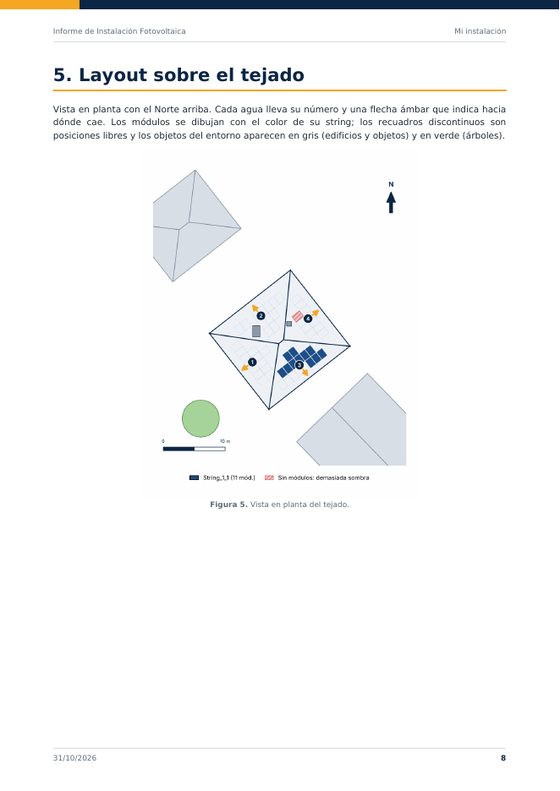
Report page: layout on the roof
Report page: loss waterfall
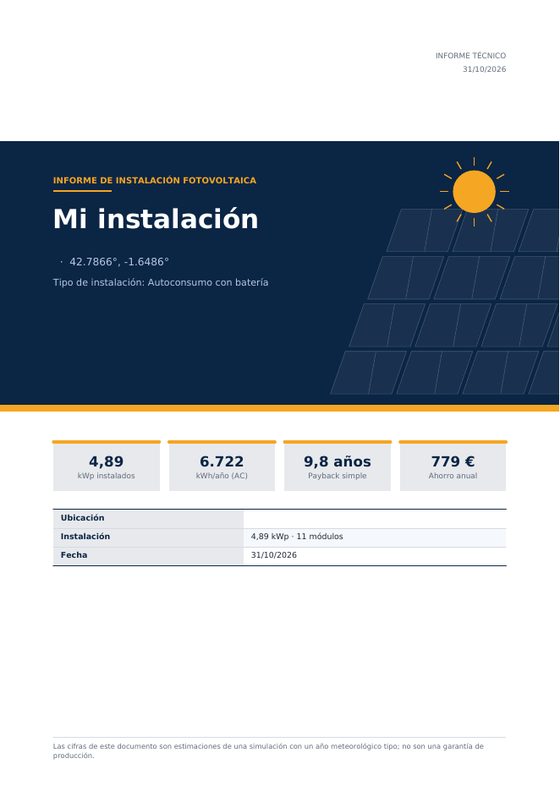
Cover of the technical report
Report for the client

A technical report that impresses, ready in one click

Cover with your branding, executive summary, components, wiring diagram, production, energy balance, economic analysis and recommendations. More than twenty pages generated automatically.

  • Full or summary version, with your logo and your details.
  • One- or two-page commercial offer to hand to the client.
  • The same numbers you see on screen, without copying and pasting.
  • Available in the application's 10 languages.
See a sample report (PDF) →
Try it now

Estimate an installation in ten seconds

A quick estimate to see the order of magnitude. The application calculates hour by hour with the site's weather year, real shading and the client's tariff.

Estimated annual production
9,250 kWh/year
Specific yield 1,850 kWh/kWp
Consumption coverage (no battery, approx.)42 %
Approximate annual savings €342

Calibrated with the Radiaris engine: 445 W modules at 30°, PVGIS typical year and primary-residence profile. Self-consumption is estimated from the ratio between production and consumption, without a battery and without valuing the surplus. Indicative values; they do not replace a full simulation.

I want the full simulation →
Pricing

A plan for the size of your team

All plans include all features; only the number of users changes. Try it free for 14 days, without a card, and with no commitment afterwards.

Solo

For the self-employed installer.

€290 /year
  • 1 user
  • Unlimited projects and scenarios
  • PDF reports with your branding
  • AI assistant
Choose Solo
Most popular

Team

For an SME with 2 or 3 technicians.

€590 /year
  • Up to 3 users
  • Everything in Solo
  • Add your colleagues by email, at no cost
Choose Team

Studio

For an engineering firm or a large installer.

€1,190 /year
  • Up to 10 users
  • Everything in Team
  • Priority support
Choose Studio

Prices exclude VAT. The first 14 days are free and without a card, with all features; afterwards you choose a plan and your projects are kept.

Roadmap

Coming soon

IN DEVELOPMENT

Shared team projects

Invite your colleagues to a project with read or edit permission.

IN DEVELOPMENT

More importable equipment

More module, inverter and optimizer files in the database.

PLANNED

Trackers on roofs and on the ground

Single- and dual-axis tracking, with backtracking on irregular terrain.

PLANNED

Solar plants

Simulation of larger plants, with several inverters, grid losses and power evacuation.

Dates depend on development and are not a commitment. Tell us what you need at hola@radiaris.com and we will take it into account.

Who is behind it

Made by a PV engineer, for installers

PhD in photovoltaic engineering, with more than five years in the sector, in both utility-scale plants and residential installations. Their work has focused on PV system modelling, bifacial technology, irradiance decomposition and backtracking algorithms, with peer-reviewed IEEE publications.

The person who reads your support message is the one who wrote the calculation engine.
Frequently asked questions

What installers usually ask

Can't find the answer? Write to us using the contact form or at hola@radiaris.com. We reply on working days, usually within 24–48 hours.

The typical meteorological year (TMY) of the site, obtained from PVGIS by default. You can also load your own weather data.

Yes. You can design off-grid or grid-connected installations, with or without export, with or without a battery and with an export limit.

Yes. In addition to the included catalogue of modules, inverters and batteries, you can add your own equipment, also from the PDF datasheet.

The engine uses published models and is checked against pvlib and hand-worked cases. Each result includes its P50, P90 and P95 uncertainty range.

Yes. The report and the offer carry your logo and your contact details, in a full or summary version.

The client's tariff is configured in the consumption and tariff step. You will find the details in the documentation.

No. You can cancel whenever you want. And before paying you get a 14-day free trial, without a card and with all features.

Yes. Data are processed in accordance with the GDPR.

In Spanish, English, Portuguese, German, French, Italian, Polish, Dutch, Turkish and Czech, both the application and the reports.

Start today

Your next proposal, in minutes

Create your account, design an installation and see for yourself how much time you save.